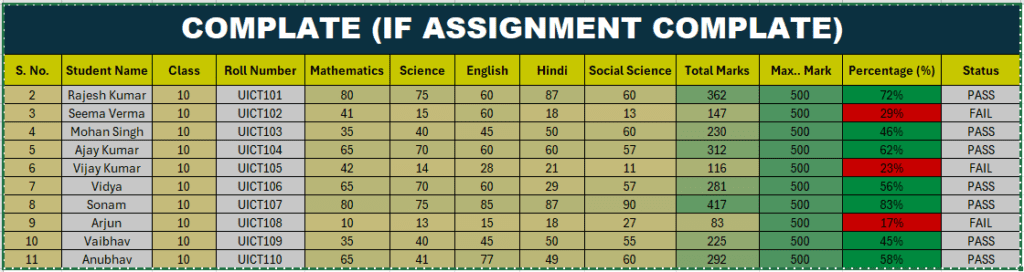
IF Formula क्या होता है?
Excel में IF Formula का उपयोग किसी condition (शर्त) को check करने के लिए किया जाता है।
अगर condition सही होती है तो Excel एक result दिखाता है और condition गलत होने पर दूसरा result दिखाता है।
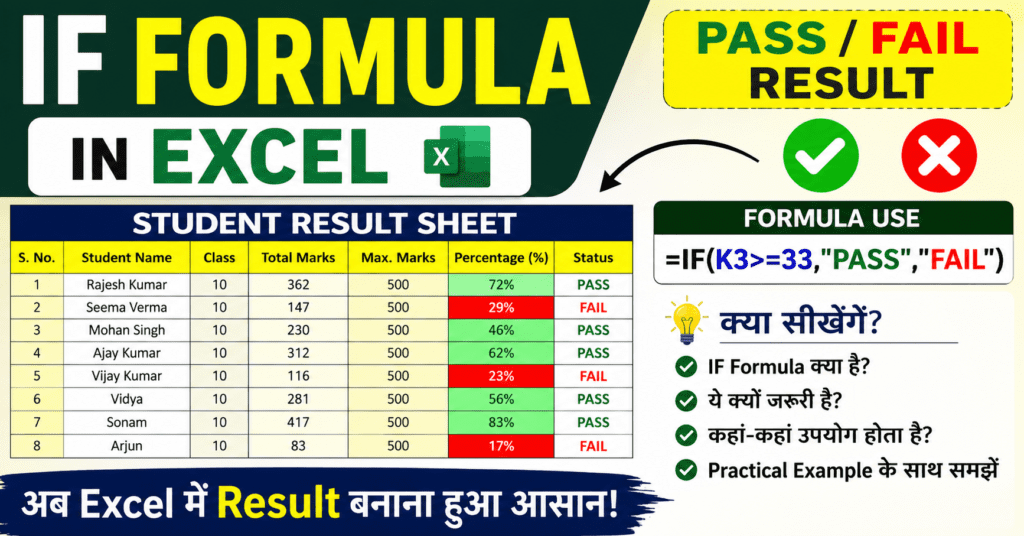
Syntax:
=IF(condition, value if true, value if false)
आपके Assignment का Formula
आपकी sheet में Percentage (%) के आधार पर PASS और FAIL निकाला गया है।
सही Formula:
=IF(K3>=33, “PASS”, “FAIL”)
Formula का मतलब
- अगर K3 cell की value 33 या उससे ज्यादा होगी → PASS
- अगर K3 cell की value 33 से कम होगी → FAIL
IF Formula क्यों जरूरी है?
1. Automatic Result देने के लिए
बार-बार manually checking करने की जरूरत नहीं पड़ती।
2. Time बचाने के लिए
बड़ी tables और records जल्दी check हो जाते हैं।
3. गलती कम करने के लिए
Formula automatically सही result देता है।
4. Smart Decision लेने के लिए
Condition के आधार पर तुरंत result मिल जाता है।
IF Formula का उपयोग कहाँ होता है?
School / College
- PASS / FAIL निकालने में
- Grade देने में
Office Work
- Salary Bonus निकालने में
- Attendance check करने में
Business
- Profit / Loss check करने में
- Stock Available या Out of Stock दिखाने में
Banking
- Loan Approved / Rejected दिखाने में
IF Formula से हम क्या कर सकते हैं?
- PASS / FAIL निकाल सकते हैं
- Grade बना सकते हैं
- Discount calculate कर सकते हैं
- Bonus निकाल सकते हैं
- Attendance check कर सकते हैं
- Profit और Loss निकाल सकते हैं
- Automatic reports बना सकते हैं
निष्कर्ष
IF Formula Excel का बहुत important logical formula है।
यह condition check करके automatic result देता है जिससे काम fast, easy और accurate हो जाता है।
Student Assignment